SCSSierra Chart Study
BlogAboutSupport
Sign InGet Started
SCS

Professional custom studies for Sierra Chart traders. Built for precision, designed to save time and protect your capital.

support@scstudies.comDiscord community

Products

  • Trade Manager
  • All Studies
  • Custom Studies

Company

  • About
  • Support & SAV
  • Terms of Service
  • Privacy Policy
  • Refund Policy

© 2026 SCS. All rights reserved.

Sierra Chart® is a registered trademark of Sierra Chart Engineering. SCS is independent and not affiliated with Sierra Chart.

Desktop Application

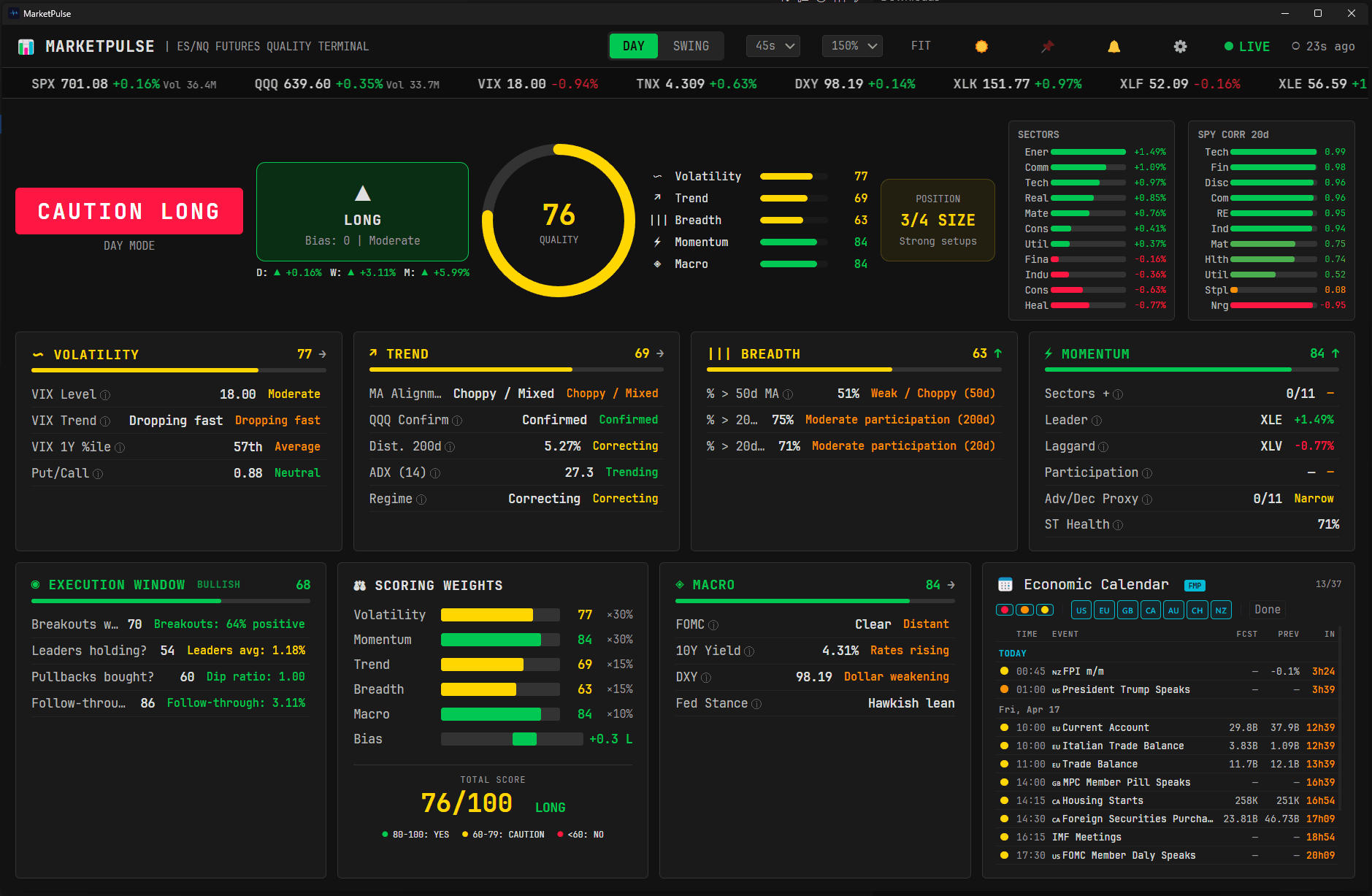
SCS Market Pulse

Real-time ES/NQ futures quality terminal — 6-pillar composite score, directional bias, and position sizing in one dashboard

$29

One-time purchase
5.0 (1 review)

You will be asked to sign in before checkout

Market Pulse — ES/NQ Futures Quality Terminal

6-Pillar Quality Score

Volatility, Momentum, Trend, Breadth, Macro, and Execution weighted into a single 0-100 composite score. Answers: "Should I trade today?"

Directional Bias Engine

LONG/SHORT/NEUTRAL with strength indicator, multi-timeframe alignment (D/W/M), and automatic position sizing recommendation (FULL to FLAT).

Zero Configuration

Standalone .exe — no API key, no Python, no database. Double-click and get a Bloomberg-style terminal with live market data in 30 seconds.

Features

  • Composite quality score (0-100) from 6 weighted pillars — Volatility, Momentum, Trend, Breadth, Macro, Execution
  • Directional bias engine — LONG/SHORT/NEUTRAL with strength indicator and multi-timeframe alignment (D/W/M)
  • Position sizing recommendation — FULL, 3/4, HALF, QUARTER, or FLAT based on market conditions
  • Day and Swing trading modes with adaptive pillar weighting
  • Real-time data — configurable refresh (15s to 2min), live ticker tape, SPY/QQQ/VIX/TNX/DXY
  • VIX analysis — level, trend, 1Y percentile, estimated Put/Call ratio, and volatility bias
  • Momentum scoring — RSI 14d, 5d/20d returns, sector leader/laggard, Adv/Dec proxy, ST Health
  • Trend detection — MA alignment (Bullish/Bearish Stack), QQQ confirmation, ADX regime classification
  • Breadth measurement — % above SMA 20/50/200 across 51 large-caps, direction-agnostic scoring
  • Macro dashboard — 10Y yield trend, DXY trend, FOMC/CPI/NFP proximity scoring, Fed stance estimate
  • Execution Window — adaptive metrics (breakdowns, bounces, follow-through) based on current regime
  • SPY sector correlation heatmap (20-day) for all 11 GICS sectors
  • Sector performance panel with real-time daily returns
  • Score sparkline history (6 hours) with trend indicator
  • Alert system — sound and Windows notifications on composite decision or bias changes
  • Earnings calendar — next 30 mega-cap earnings with alert banner
  • Economic calendar (Forex Factory, week-ahead) — filter by impact level (H/M/L chips), currency (flag chips), and Done toggle
  • Live 1-second countdown per economic event — imminent events blink red, upcoming-hour events highlighted orange
  • Forecast + Previous values inline, with Actual values via optional free FMP API key (250 req/day tier)
  • Pre-event alerts (Windows notification) — configurable minutes before High-impact events (5/10/15/30/60 min)
  • On-release alerts when Actual values publish (FMP key required)
  • Settings modal (⚙️) — FMP API key, alert timing, on-release toggle, auto-saved to userData/settings.json
  • Economic calendar resilience — 2-tier cache (5 min memory + 30 min disk) + automatic FMP fallback if Forex Factory is unreachable
  • Zoom control — 100 % to 180 % dropdown with auto-fit (FIT) button for multi-monitor setups
  • Efficient data layer — 2-tier Yahoo cache (daily history 8 h, spot 60 s), ~25× bandwidth reduction vs v1.0
  • Robust cache policy — partial failures retry fast, full failures never black out the dashboard
  • STALE indicator when data is older than 3 minutes
  • Dark and light theme — Bloomberg Terminal inspired design
  • Standalone desktop application — no API key required, no installation, no database
  • Keyboard shortcuts — D/S mode toggle, Ctrl+R refresh, T always-on-top, Delete to minimize
  • Auto-updates via electron-updater — Settings (FMP key, filter state, alert preferences) persist across versions
  • Windows 10/11 (64-bit), ~150 MB disk space
  • Description

    Market Pulse is a real-time market quality terminal for ES (S&P 500) and NQ (Nasdaq 100) futures traders. It aggregates six analytical pillars — Volatility, Momentum, Trend, Breadth, Macro, and Execution — into a single composite score from 0 to 100, a directional bias (LONG / SHORT / NEUTRAL), and a recommended position size (FULL to FLAT).

    The interface is inspired by professional trading terminals: dark background, monospace typography, semantic color coding (green = favorable, red = risk, yellow = caution), and a dense but readable layout.


    The Two Questions

    Market Pulse answers two fundamental questions before every session:

    Question Answer
    Should I trade today? The composite score: YES (80+), CAUTION (60-79), or NO (<60)
    In which direction? The directional bias: LONG, SHORT, or NEUTRAL

    A high score does not mean the market is going up — it means conditions are favorable for trading. A strong downtrend with clear breadth alignment and low VIX can score 90+, signaling excellent conditions for short trades.


    The 6 Scoring Pillars

    Volatility (VIX)

    Evaluates the volatility environment. Combines VIX level, 5-day slope, 1-year percentile, and estimated Put/Call ratio. Low and stable VIX = best conditions.

    Momentum

    Measures price momentum quality — direction-agnostic. Uses RSI 14d with smoothed scoring (continuous interpolation, no discontinuous jumps), 5d/20d absolute returns, sector leader/laggard participation, and an Advance/Decline proxy with Short-Term Health reading. Strong momentum in any direction = high quality.

    Trend

    Assesses trend clarity via moving average alignment (Bullish/Bearish Stack detection), QQQ confirmation, distance to SMA 200d, and ADX (14) regime classification (±10 point bonus/malus). Clear trends = high quality, chop = low quality.

    Breadth

    Measures market participation across 51 large-caps representing all 11 GICS sectors. Tracks % above SMA 20d, 50d, and 200d. Direction-agnostic: both strong participation (>75%) and washout (<25%) signal consensus = high quality.

    Macro

    Evaluates the macroeconomic backdrop: 10Y yield trend (TNX), dollar trend (DXY), and proximity to high-impact events (FOMC, CPI, NFP). Distant events + stable rates = favorable.

    Execution Window

    Adaptive pillar that checks whether setups in the dominant direction are actually working. Tracks breakdowns holding, laggards staying down (or leaders extending), bounce failures, and follow-through quality. Adjusts its metrics based on the current regime.


    Trading Modes

    Mode Best for Weighting emphasis
    DAY Intraday scalps and day trades Volatility 30%, Momentum 30%, Trend 15%, Breadth 15%, Macro 10%
    SWING Multi-day positions Volatility 25%, Momentum 25%, Trend 20%, Breadth 20%, Macro 10%

    Toggle between modes with the DAY/SWING button or keyboard shortcuts (D / S).


    Position Sizing

    Based on the composite score, Market Pulse recommends a position size:

    Score Size Meaning
    80+ FULL Lean into risk
    70-79 3/4 Solid setups
    60-69 HALF A+ setups only
    50-59 QUARTER Very selective
    <50 FLAT Preserve capital

    Economic Calendar

    A full week-ahead economic calendar lives at the bottom of the dashboard. Events are fetched from Forex Factory (free, no API key required) and ordered chronologically across the current trading week.

    Filters

    Three interactive chip rows let you narrow the calendar live:

    • Impact level — three colored pills (Haut / Moyen / Bas) that mirror the red/orange/yellow dots next to every event. Click to include or exclude each impact tier. Combine freely (e.g. High + Low only).
    • Currency / country — flag chips for every currency present in the week (🇺🇸, 🇪🇺, 🇯🇵, 🇬🇧, 🇨🇦, 🇦🇺, 🇳🇿, 🇨🇭…). Click to isolate a subset.
    • Done toggle — off by default (only upcoming events are shown); switch on to include events already past in the current day.

    All filter states persist across app restarts.

    Live countdown

    Every upcoming event shows a 1-second countdown to release (03h 14m 22s). Imminent events (< 5 minutes) blink red; events within an hour are highlighted in orange. The countdown runs locally so it ticks smoothly without waiting for the next poll.

    Forecast / Previous / Actual (via FMP)

    Each row displays the market Forecast and Previous value out of the box. For Actual values as they release, add a free Financial Modeling Prep API key in the Settings modal (250 free requests/day is more than enough for day trading). When the key is active, a small FMP badge appears in the calendar header and actual values populate live as they publish.

    Pre-event and on-release alerts

    Two alert types, both delivered as native Windows notifications:

    • Pre-event — fires N minutes before a High-impact event (configurable in Settings — Disabled / 5 / 10 / 15 / 30 / 60 min, default 15). Tracked per event so an alert never fires twice.
    • On-release — fires when the Actual value publishes (FMP key required).

    Resilience

    • 2-tier cache — Forex Factory payload is cached in memory (5 min) and also persisted to disk (30 min TTL). On app restart, events show immediately without waiting for a network round-trip.
    • FMP fallback — if Forex Factory is unreachable (rate limit, outage), the calendar transparently switches to FMP's economic_calendar endpoint as a secondary source.
    • No more empty panel — short network hiccups no longer blank out the calendar for the rest of the session.

    Dashboard Components

    • Top Bar — Mode toggle (DAY/SWING), refresh interval selector (15s / 30s / 45s / 2m), zoom level (100–180 %) with auto-fit button, theme toggle, pin window, alert toggle, Settings gear, LIVE / STALE indicator, "seconds ago" counter
    • Ticker Tape — Scrolling real-time prices with SPY/QQQ volume: SPX, QQQ, VIX, TNX, DXY, XLK, XLF, XLE, XLV, etc.
    • Alert Banner — FOMC/CPI/NFP proximity warnings (red < 24 h, yellow 24–72 h) and a separate orange banner for upcoming mega-cap earnings (5-day horizon)
    • Hero Panel — YES/CAUTION/NO badge, direction arrow with bias strength, circular score gauge with trend arrow and 6-hour sparkline, mini pillar scores, D/W/M multi-timeframe bias, position recommendation, SPY correlation heatmap (20-day rolling vs 11 sectors)
    • Detail Panels — Dedicated cards for each pillar with individual metrics, colored tags, and ⓘ tooltips on every metric
    • Bottom Row — Execution Window (4 adaptive metrics), Sector Performance (bidirectional bars, 11 sectors sorted by return), Scoring Weights (per-pillar decomposition with centered bias bar and final composite)
    • Economic Calendar Panel — Week-ahead filterable calendar (see section above)

    Settings Modal (⚙️)

    A gear icon in the top bar opens a Settings overlay with three groups:

    • FMP API key — paste your free Financial Modeling Prep key to unlock Actual values in the economic calendar. A link to the free registration page is included. Saved and masked — the renderer never sees the raw key.
    • Pre-event alert timing — dropdown: Disabled / 5 / 10 / 15 (default) / 30 / 60 minutes before a High-impact event. Select Disabled to silence only the pre-event alert while keeping decision/bias and on-release notifications active.
    • Alert on release — toggle for the actual-published notification.

    Every change auto-saves to userData/settings.json — no Save button.


    Key Features

    • Live data with configurable refresh interval (15 s / 30 s / 45 s default / 2 min) and Ctrl+R manual refresh
    • 2-tier Yahoo cache — daily 1-year history cached 8 h, only spot quotes refetch every 60 s. Bandwidth divided by ~25 vs the first version. Resilient to transient partial failures — the dashboard never blacks out again after a Yahoo hiccup.
    • Sound alerts and Windows notifications when the composite decision changes (e.g., CAUTION → YES) or the directional bias flips
    • Score history sparkline showing the last 6 hours of composite score evolution with trend arrow (▲ / ▼)
    • Earnings calendar banner — highlights upcoming mega-cap earnings within 5 days
    • Multi-timeframe bias — Daily, Weekly, and Monthly trend arrows for quick alignment check
    • SPY correlation heatmap — 20-day rolling correlation of SPY vs all 11 GICS sectors
    • Dark and Light themes — toggle ☀️/🌙, all components adapt
    • Zoom control — 100 % to 180 % via dropdown, plus an auto-fit button that adapts the UI to your window size
    • Always-on-top — 📌 button or T shortcut, ideal for multi-monitor trading desks
    • STALE indicator — the LIVE dot turns orange and the label flips to STALE when data is older than 3 minutes
    • Keyboard shortcuts — D / S mode toggle, Ctrl+R refresh, T always-on-top, Delete minimize

    Data Sources

    Data Source Cadence
    Prices + volume (SPY, QQQ, VIX, TNX, DXY, 11 sectors) Yahoo Finance Spot 60 s, history 8 h
    1-year daily OHLC Yahoo Finance 8 h
    Breadth (51 large-caps) Yahoo Finance 8 h
    FOMC / CPI / NFP proximity Federal Reserve + BLS (scrape) 12 h
    Week-ahead economic events Forex Factory (free, no key) 5 min memory + 30 min disk
    Actual values for economic events FMP (optional, free key) 2 min
    Earnings (30 mega-caps) Yahoo Finance 12 h

    No data ever leaves your machine except the outbound API polls listed above. No telemetry, no account, no subscription to external platforms.


    System Requirements

    Requirement Specification
    OS Windows 10/11 (64-bit)
    Internet Required (live market data)
    Disk space ~150 MB
    Display 1920x1080 recommended
    Installation None — double-click market-pulse.exe
    API keys None required (FMP optional, free tier)
    Dependencies None — fully standalone

    Reviews(1)

    D

    DerDaily

    April 11, 2026

    5.0

    The developer is great and creates excellent products. If possible, adding red folders and date/time/countdown/exc details would be a nice bonus. Overall, it’s flawless work.

    Sign in and purchase to leave a review.

    $29

    One-time purchase · Lifetime access

    You will be asked to sign in before checkout

    One-time payment — no subscription
    Includes all future updates
    Support via support@scstudies.com